
Khronometr
Screen time for all time
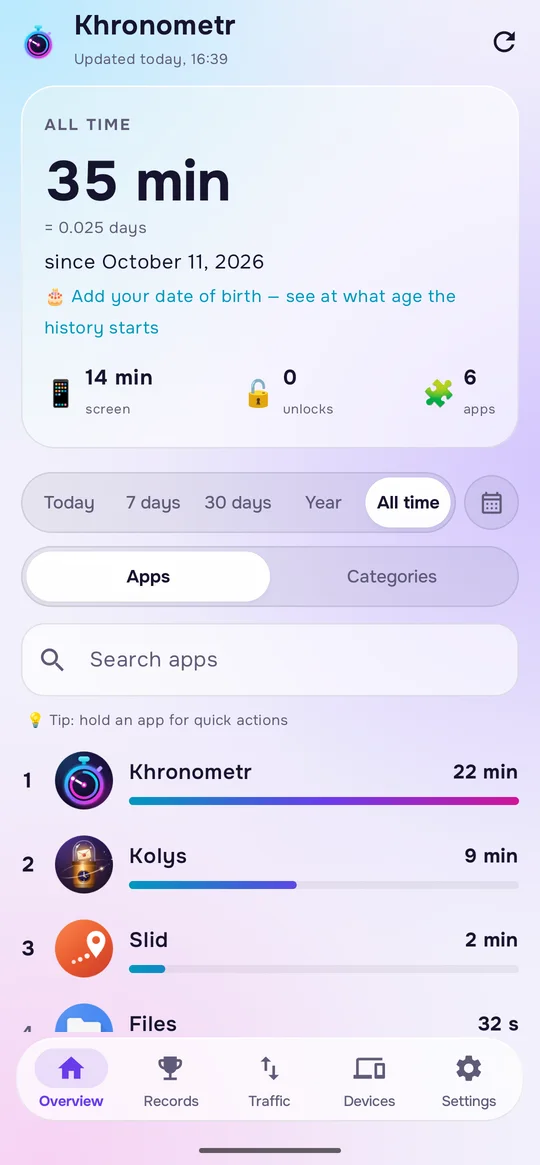
How long you have spent in every app and game — not for the last few weeks, but for all time. On your phone, tablet and PC together.
Free · Android 8 or newer
Checks for updates about twice a day and can install them by itself, if you allow it.
Scan to open this page on your phone
How it works
- 1
Install on the phone
Turn on “Usage access” once. Khronometr then reads the history the phone still keeps and counts on its own from then on.
- 2
Add your other devices
Connect Google Drive on each phone, tablet and the Windows app — they find each other.
- 3
Look back any time
Days, weeks, months or years, every app or a category, one device or all of them.
What it can do
All-time history
Every app and game, day by day, with records, titles and your biggest day. Kept on your phone for as long as you keep the app.
History from before
On the first start it takes what the phone still remembers. Older days are an estimate, marked ≈.
All your devices
Phones, tablets and a Windows PC in one place, through a hidden folder on your own Google Drive.
Limits
Time per day, forbidden hours and a “Time’s up” screen, for one app, a category or your own group, on the devices you choose. It reminds you, it does not lock: you can always close it.
Widgets
Today, the week, the top apps, one app, your limits and all-time totals right on the home screen.
Traffic
Wi-Fi and mobile data per app, for any days you pick. Mobile data needs Android 10 or newer.
A few more things
Counted once
When two of your devices are on at the same moment, that time is counted once, not twice.
Limits shared by devices
One limit can add up the use on all the devices you pick. This needs sign-in with Google.
One app on two devices
Join an app’s entries from different devices, such as Telegram on your phone and PC, to see them as one in lists, totals and limits. You can undo it at any time.
When you use each app
A map of the week by hour for every app, and how much space the app takes.
Traffic kept past 90 days
Android forgets per-app traffic after about 90 days. Khronometr saves every day and keeps it.
Back after a reinstall
If sync was on, sign in again after a reinstall and your own history comes back from your Drive.
Evening summary
Optional. A notification with today’s time and your top three apps.
A backup of your whole history as a zip file · No ads
Questions
The “Usage access” switch is grey
Android does this to apps that were not installed from Google Play. Open Khronometr’s page in the system settings, tap ⋮ at the top right, choose “Allow restricted settings”, then try the switch again.
How do updates work?
The version from this website checks for a new version about twice a day. If “Update automatically” is on (it is by default) and Android has allowed it to install apps, it downloads and installs the update; Android may still ask you to confirm. Otherwise it shows a notification. Turning the setting off stops the installing, not the checking.
What happens on a new phone?
Sign in with the same Google account: if sync was on, your own history comes back from your Drive. Android’s own backup does not carry the app’s data. You can also move a zip backup by hand.
How exact is the old history?
Android keeps exact details for only about 10 days. Older days come as totals, spread evenly over their period, so they are an estimate and are marked ≈. From the day you install, Khronometr saves exact time itself.
Can I delete my cloud copy in the app?
Yes. “Delete my copy from Google Drive” removes the copy for all your devices. Turning sync off alone only stops this device from sending and receiving; what is already on your Drive stays.
Does it block apps?
No. A limit shows a “Time’s up” screen over the app, with “Leave”, “5 more minutes” and “Don’t show again today”. It is a reminder you can always close.
What’s new: 0.32.1
The first screen now says that continuing confirms your age and accepts the Terms, and that the app is for your own device. App install dates no longer go into the Google Drive copy.
How do I check the file?
The SHA-256 checksum of the file you download must match this one:
Your data stays yours
No Khronometr server, no ads, no tracking. Everything is kept on your devices and, if you want, in a hidden folder of your own Google Drive. The privacy policy lists the few outside requests the apps make.
Read the privacy policyQuestions and ideas: support@pegasohlib.com