For Windows 10 and 11
Kadr
A free video and photo editor for Shorts and YouTube
Cut vertical videos for TikTok, Shorts and Reels or regular YouTube videos, and make thumbnails, collages and posts. Background removal and AI enhancement of photos run on your own PC.
Free · no ads · Windows 10 and 11 (64-bit)
Updates are checked from inside the app; you can turn off the automatic download
27 languages, the same as this website
How it works
From the first clip or photo to a finished file in four steps.
- 1
Install
Run the installer. It installs for your Windows user, with no administrator rights. If Windows warns you, click More info, then Run anyway.
- 2
Start a project
For video, pick a format: 9:16, 16:9, 1:1 or 4:5. For a picture, open a photo or pick a ready canvas size.
- 3
Edit
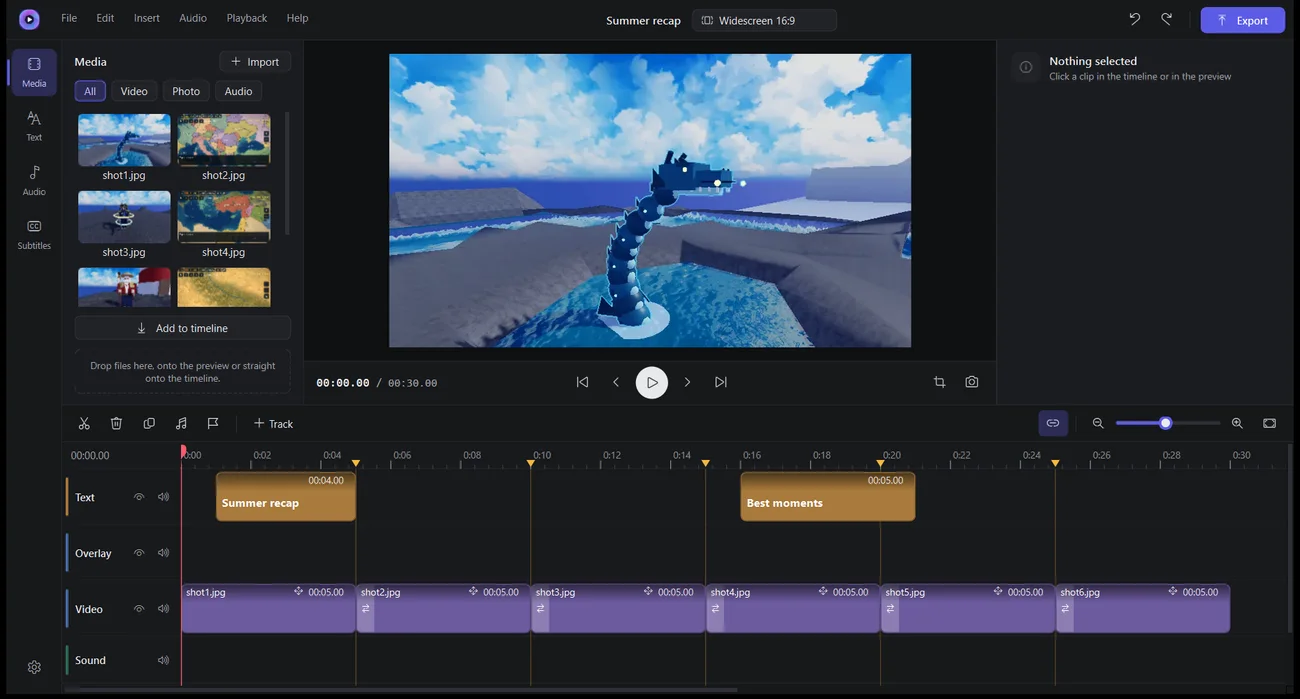
Put clips, photos and music on the timeline, cut them, add titles, transitions and filters. In the photo editor, add layers and text and remove the background.
- 4
Export
Save a video as MP4 (480p up to 4K), a GIF or an MP3, and a picture as PNG, JPG or WebP.
Video editor
Multi-track timeline
Many video and audio tracks with thumbnails and waveforms. Split, trim, copy, snapping and markers.
Titles
Style presets, any font on your PC, an outline, a background box and animated appearance.
Transitions and speed
Dissolve, dip to black, slide and zoom. Speed from 0.1× to 8× with pitch kept, plus a speed curve inside a clip.
Vertical framing
Fit or fill, drag a layer in the preview, and a slow zoom and pan for photos and video.
Colour
Six filters, brightness, contrast, saturation, sharpness and film grain.
Sound
Detach audio, volume up to 200%. An optional per-clip setting lowers a track under other sound, and export can level loudness to −14 LUFS. Beat markers work best on music with a steady tempo.
Subtitles
Import and export .srt. Optional auto-subtitles through ElevenLabs, with your own API key.
Export
MP4 in 480p, 720p, 1080p, 1440p or 4K at 24–60 fps, a GIF or an MP3. For 4K you can choose fast scaling or AI upscaling, which is slow without a supported graphics card.
Photo editor
For YouTube thumbnails, collages and posts.
Layers and canvas sizes
Photos and text as layers. Ready sizes for a thumbnail, a square post and a story.
Background removal
One click, on your PC. The model, about 115 MB, is downloaded once. There is also a blur brush and Blur background.
AI enhancement ×2 or ×4
Real-ESRGAN models of 2–5 MB, downloaded once. Your photos are never uploaded.
Brush, shapes and clipboard
Brush, eraser, arrows and shapes. Ctrl+V pastes a screenshot, Ctrl+Shift+C copies the result.
Free, no ads · Autosave for video projects · Signed updates
Questions
Windows says “Windows protected your PC”. Is that OK?
Windows shows this for apps without a paid code-signing certificate, and Kadr doesn’t have one. Click More info, then Run anyway. Kadr’s own updates are checked against a digital signature before they are installed.
Are my videos or photos uploaded anywhere?
No. They stay on your computer, and background removal and enhancement run on it too. The one exception is auto-subtitles, and only when you start them: the audio of the chosen clip goes to ElevenLabs with your own API key.
What does Kadr need the internet for?
To check for updates (when Kadr starts and every 6 hours), to download an update, and once per AI model. The check itself cannot be turned off; in Settings → Updates you can turn off only the automatic download. Auto-subtitles also go online, if you use them.
Does AI need a strong graphics card?
No, but it is much slower without one. With DirectML on (the default) AI uses the graphics card; background removal can take around 5 GB of video memory. In Settings → AI you can switch to the processor only.
What if Kadr or the PC crashes?
A video project is autosaved every 45 seconds and Kadr offers to recover it next time. Photo projects are not autosaved, so save them yourself.
What is Kadr built from?
It uses open-source parts such as FFmpeg and Qt, and Microsoft DirectML, which is closed. Every part and its license are listed in the app under About → Licenses. As these licenses require, the source code of the open-source parts is available to download.
How do I remove it, and what stays?
Uninstall Kadr in Windows Settings → Apps. Your settings, recent project paths and the encrypted ElevenLabs key stay in the registry, and the autosave, cache and models stay in %LOCALAPPDATA%\Kadr. The privacy policy says how to delete them.
What’s new: 2.9.3
Updates now trust only the signed version number. The ElevenLabs key window says you must be 18 or older. The installer has a privacy link and says what continuing means. Licenses updated.
How do I check the file?
The SHA-256 checksum of the file you download must match this one:
Your videos and photos stay on your PC
Kadr has no account, no ads and no analytics, and the developer receives no data. It goes online for updates, to download AI models once, and for auto-subtitles if you start them. With DirectML on, Microsoft may receive diagnostic data under your Windows settings.
Read the privacy policyQuestions and ideas: support@pegasohlib.com