
Kraplya
A drop wears away the stone
Set a goal for every habit, start the timer when you practise, and watch the week fill up drop by drop. Simple, calm and private.
The app looks for new versions when you open it, and you install them with one tap.
For Android 8 and newer · Google Play later
Scan to open this page on your phone
Right on your home screen
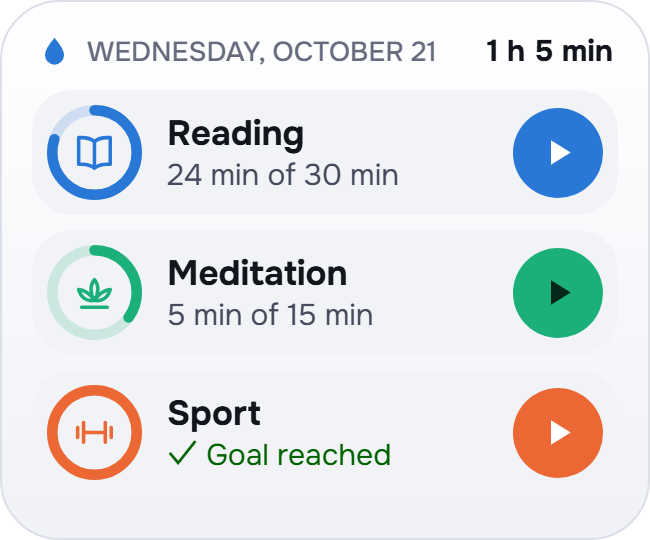
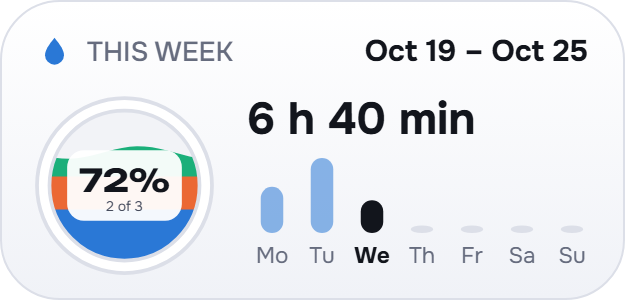
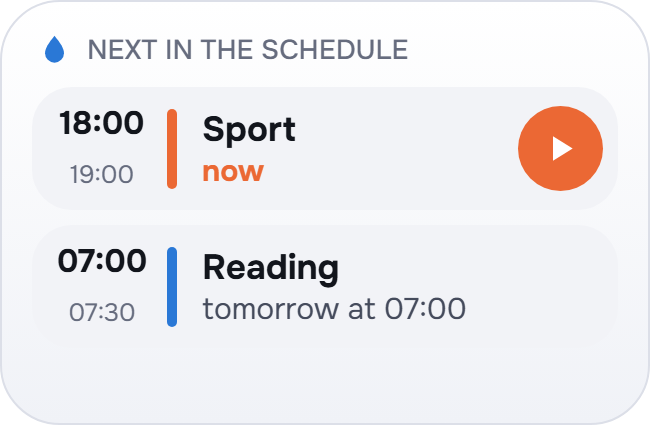
Three widgets: today’s habits, the week and your schedule.
What it can do
Goals your way
A goal per day, week or month for every habit. Daily goals can be for chosen weekdays or every few days. Missed a day? Make it up later in the week.
A timer that keeps going
It counts with the screen off and the app closed, pauses and resumes, and can be stopped right from the notification. Time can also be added by hand.
Yes or no, or a number
Besides timed habits, track yes/no habits with one tap and counters with a daily number, such as 8 glasses.
Weekly schedule
A real 7-day calendar: plan sure and maybe blocks, see what you actually did on top, and bring in events from your phone calendar.
The week’s vessel
Every habit pours its colour into the vessel. On Monday you get a summary, and a reward you chose for yourself, or a penalty.
Statistics
Day streaks, charts, an activity calendar and records for a week, a month, a year and all time.
Widgets
Today’s habits with a start button, the week at a glance and what’s next in your schedule, right on the home screen.
Reminders
On by default: a Monday summary and reminders for your scheduled blocks. You can add an evening nudge and your own reminders, and turn any of them off.
Phone and tablet
Optional sync through your own Google Drive keeps both devices the same. It needs a Google sign-in; Kraplya has no accounts of its own.
Small things that help
Forgot to stop?
Come back after a long time and Kraplya asks how much of the run should count.
One timer on two devices
With sync on, a running timer shows on your other phone or tablet too.
Your story
Add a date of birth and your statistics show how old you were when you began.
How strict a week is
Choose how much of the plan makes a week count: 70, 80, 90 or 100 percent.
Can’t pick a reward?
Keep lists of rewards and penalties and let chance decide.
Archive and templates
Archive a habit and keep its history, or start from a ready-made habit.
27 languages · Light and dark theme · Backups to a file · Tablet layout in two columns
Questions
How do I install it?
Download the APK and open it. Android will ask once to allow installing from this source. Kraplya needs Android 8 or newer, and Google Play comes later.
How do updates work?
When you open the app it checks the Kraplya website, at most every 30 minutes, and offers a new version. You tap Update and Android may ask you to confirm. It installs over the current version and your data stays. Automatic checks can be turned off in Profile; there is no check in the background.
What happens to my data on a new phone?
It lives on the device. Turn on Drive sync and sign in on the new phone to bring it over, or save a backup file on the old phone and import it on the new one. Without either, uninstalling removes it.
What leaves my phone?
Nothing, unless you turn on sync: then a copy goes to the hidden folder of your own Google Drive. The app also asks the Kraplya website for updates. No ads, no analytics.
What are the limits?
Kraplya is for Android only. Sync needs a Google sign-in and an internet connection, and changes reach your other device when you open the app or within a few hours.
What’s new: 0.9.20
The first screen now says that continuing confirms your age and accepts the Terms. The cloud button is now called Connect Google Drive, and the help for Google’s warning no longer suggests continuing past it.
How do I check the file?
The SHA-256 checksum of the file you download must match this one:
Your data stays yours
No ads, no analytics and no accounts of its own. Everything is stored on your device, and only you decide whether to keep a copy in your own Google Drive or in a backup file.
Read the privacy policyQuestions and ideas: support@pegasohlib.com