Kolys
A letter to your future self
Write yourself a letter, add photos and seal it until the day you choose. Kolys won’t show it before then, and on the day a notification tells you it is ready.
The app looks for new versions when you open it, and you install them with one tap.
An app for Android phones · Android 8 and newer
Scan to open this page on your phone
How a time capsule works
Write today, and read it on the day you choose.
- 1
Write
A letter in your own words, with up to 12 photos and videos and up to 3 voice messages. Gentle questions help when the page is blank. You can also take photos and videos right in the app.
- 2
Seal
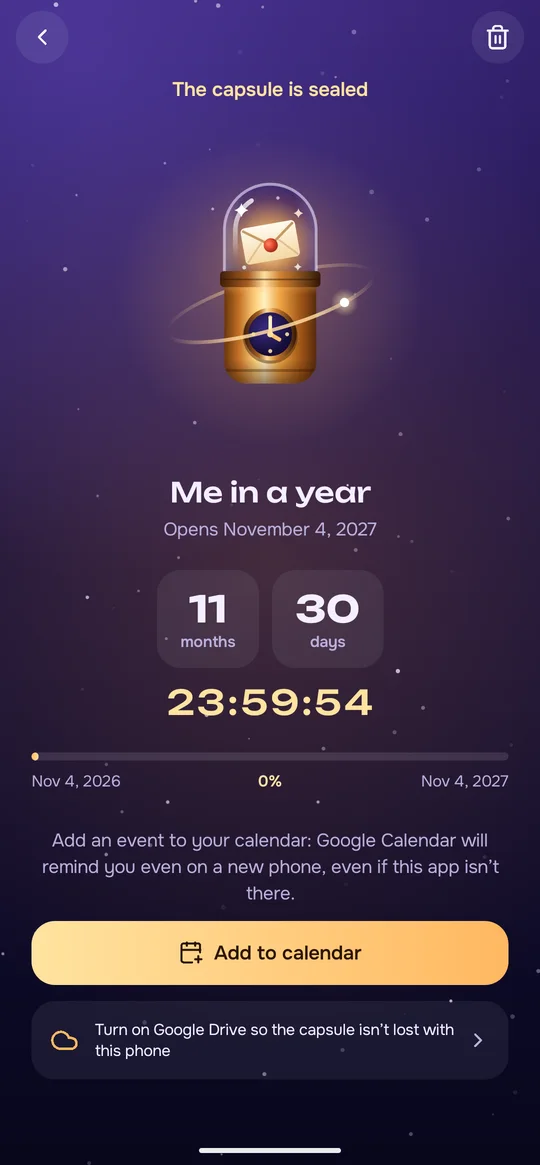
In a month, a year, ten years or on any date up to 100 years ahead. The date is checked online, so moving the phone’s clock won’t open it early.
- 3
Open
On the day a notification arrives (the phone needs internet). Tap it and the capsule opens with a little light show.
- 4
Keep
If you sign in with Google, sealed capsules are saved in a hidden folder on your own Drive. On a new phone, sign in with the same account and they come back; drafts stay behind.
What it can do
Voice and video
Voice messages up to 5 minutes, videos with a player of their own and photos that zoom with two fingers or a double tap. Once a letter opens, Memories shows them as a slideshow.
This moment
Your mood, a song you pick and, if you allow it, the city and the weather. Letters to yourself also keep the phone’s name or model and its battery level.
A capsule as a gift
Send a sealed letter to a friend or a whole group as a file in any messenger. Kolys opens it only on the chosen day, and a secret word can lock it.
Special dates
Seal a capsule until a birthday, until New Year or for 1000 days, not just for a month, a year or ten.
Reminders along the way
A note when a capsule has waited half its time (capsules of 60 days or more) and another a week before it opens (30 days or more). You can turn them off in Settings.
Remember
One tap opens your calendar app with the opening day filled in. Save it there, and the reminder can find you even on another phone.
Widget
Your nearest capsule on the home screen, with the days left. In three sizes; the large one shows three capsules and a + for a new one.
Drafts and replies
Drafts save themselves as you write. Once a letter opens, reply to yourself: the reply is a new capsule that keeps the earlier letter.
Things you may not expect
Write together
Everyone adds a letter to one group capsule, or a group writes to one person. Until the day the app shows who has written, never what.
Forgot the secret word?
Your phone remembers the word of each gift you locked, so you can look it up on its screen. The file itself can’t give it back.
Opened once, opened everywhere
Open a capsule on one phone, and your other phones with the same Google account and Drive show it as opened.
Replies keep the past
A reply keeps its own copy of the letters it answers, so they survive deleting the original.
Far ahead
Pick any date up to 100 years away. A video can be up to 500 MB.
Until a friend’s birthday
Writing to a friend, you can seal the capsule until their birthday by entering the date.
27 languages · Light and dark theme · A copy in a file, without Google
Questions
How do I install it?
Download the app on this page and open the file. Android may ask you once to allow installing from that source. You need Android 8 or newer.
How do updates work?
When you open the app, it checks the Kolys website for a new version, at most once every 30 minutes (you can turn this off in Settings). It never installs anything by itself: you tap Update.
Can anyone read a sealed letter early?
Kolys won’t open or show it before its day, but the lock is in the app, not encryption. What is in the app’s private storage and the zip in your Drive is not encrypted, so someone who gets past Android’s app protection could read it, and Google could read the Drive copy. A gift locked with a secret word is encrypted; without a word the key sits inside the file, and a group’s key sits in its invite file.
What happens on a new phone?
Sign in with the same Google account, and the sealed capsules saved to Drive come back. Or save a copy to a file in Settings and restore it on the new phone, without Google; a copy holds drafts too. Letters still being collected for a group capsule stay on the old phone. Without Drive or a copy, nothing comes back.
What does “this moment” record?
Your mood, a song and, if you allow it, the city and the weather. Letters to yourself also keep the phone’s name or model and its battery level. Gifts and group capsules don’t carry them.
What if I delete a capsule?
The letter, its files and reminders leave your phone at once. On Drive the zip is deleted and a tiny “gone” file stays, so your other phones delete it too. Files you already sent stay with the people who got them.
What’s new: 0.9.4
The first screen now says that continuing confirms your age and accepts the Terms. A reply sent as a gift or group capsule carries only the new letter, without the earlier ones. There is a note that a video can show where it was filmed, and the Google Drive button and text are clearer.
How do I check the file?
The SHA-256 checksum of the file you download must match this one:
Your data, plainly
No accounts of ours, no servers, no ads, no tracking. Letters stay on your phone and, if you choose, in your own Google Drive. The app locks them, it does not encrypt them, so look after your phone and Google account.
Read the privacy policyContact: support@pegasohlib.com